
Flexible Page Ordering for Report Templates
Report Templates now give you direct control over which pages appear in a report and the order they appear in — independent of editing page content.
When creating or editing report templates, you'll see two new tabs - Template Pages and Fund Package Pages. Click the toggle in the Enabled column to turn individual pages on or off. To reorder pages, you can either drag-and-drop pages or use up/down controls in the Order column.
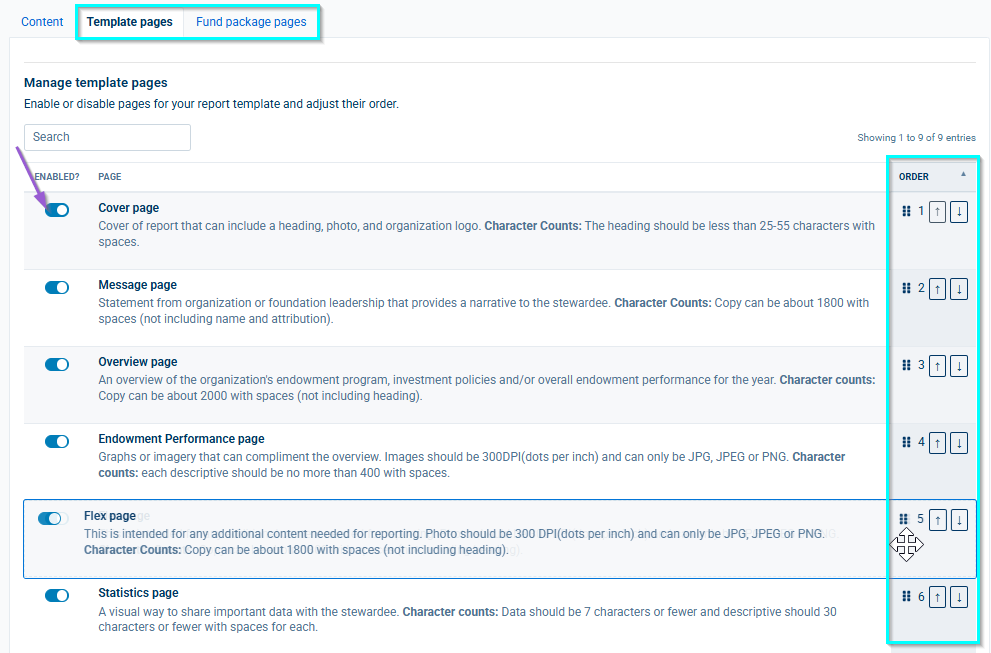
Changes save automatically as you toggle or reorder - there's no separate Save step for these two tabs.
If no Fund Package pages are enabled, that section is simply omitted from the generated report.
Content on a disabled page is preserved, not deleted. You can re-enable a page at any time and its content comes back exactly as you left it.
The Content tab now lists only enabled pages, in the order set on the new tabs, keeping page editing focused and uncluttered.
Reply
Content aside
-
1
Likes
- 2 wk agoLast active
- 7Views
-
1
Following