
Impact Updates: August 2026
Release Date: August 8, 2026
Multiple Impact Types per Recipient
Impact now supports assigning multiple impact types to a single recipient for the same fund. Previously, each recipient was limited to one impact template per fund — if a donor's scholarship award included both a narrative quote and a Q&A page submission, those had to be managed separately or as workarounds. With this release, a recipient can hold impacts under multiple templates simultaneously, giving institutions full flexibility to capture and report on all relevant impact types for each award relationship.
Recipients can now be associated with more than one impact template for the same fund
All bulk import types (Fund Recipients, Horizontal/Vertical Thank You, QA Page, Narrative Quote) have been updated to support multi-template recipients without generating errors
The Bulk Image File will now require the impact version to support multiple versions per recipient.
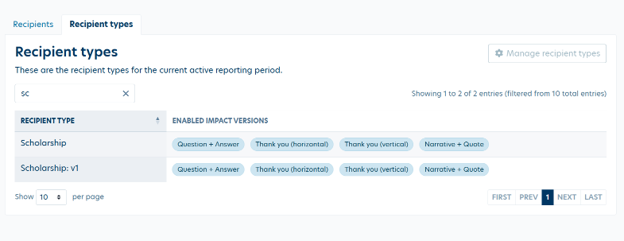
The Recipient Types page has been redesigned to display and manage the full set of impact templates associated with each recipient type
NEW Classic 2.0 Template Guide
The Classic 2.0 Template Guide is now published and accessible directly within the Manage Designs section of the Impact Administration interface. This guide provides detailed documentation on the Classic 2.0 design — including page layouts, available content zones, font and color options, and configuration recommendations — making it easier for administrators to build and refine report templates without needing to reference external documentation.
Impact Report Template Guide 2026
Report Template Builder: Improved Image Upload Experience
The image upload experience in the Report Template builder has been significantly improved.
File validation feedback is shown immediately on upload — invalid file types or sizes are flagged before the upload completes
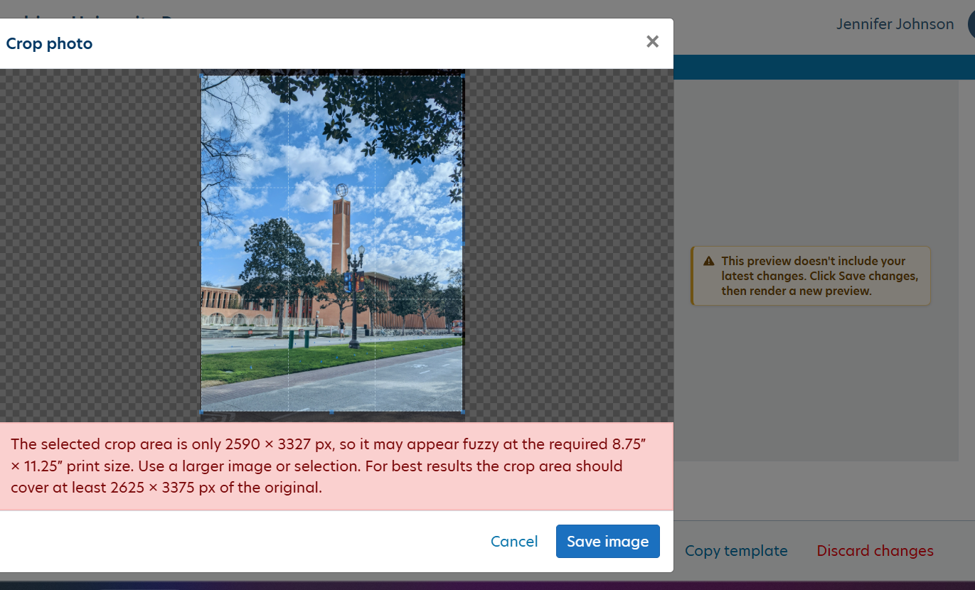
A built-in crop tool allows administrators to frame and adjust images directly within the template builder
New Font Option: PT Sans
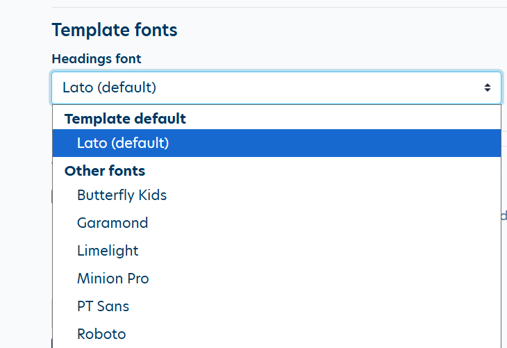
PT Sans has been added to the available font options in Manage Designs.
"Recipient Type" Column Removed from Impacts Tab
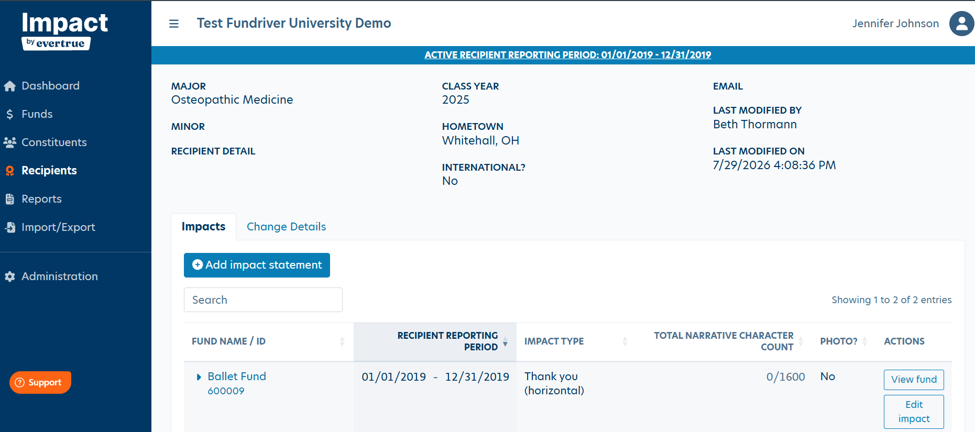
The "Recipient type" column has been removed from the Impacts data grid on the Recipient Detail page. Because this column displayed the same value on every row (a recipient has only one type), it was redundant alongside the existing "Impact type" column which shows per-impact template information. Removing it reduces visual noise and makes the grid easier to read.
PDF Rendering
Configurable Footer on Fund Financial Pages
Fund Financial pages in Impact reports previously displayed an auto-generated footer containing the Constituent ID and Fund ID. A new configuration option within Administrative System Settings view now allows institutions to suppress the Constituent ID and Fund ID footer on Fund Financial pages. The default setting suppresses the footer, so institutions will receive this improvement automatically on their next report generation without any action required.
Justified Text Spacing
Justified text across several page types was being rendered with cramped word and letter spacing, making paragraphs difficult to read. A new Left Justify setting has been added that corrects the spacing behavior. The setting is configurable at the Administrative System Setting level for institutions that prefer left-aligned body text over justified alignment.
Overview Page Heading Width
The heading on the Overview page was being constrained to 3.2 inches when it had 4.2 inches of available space, causing headings to wrap unnecessarily. The heading now uses the full available width with margins consistent with the body paragraph text.
Non-Printable Characters in Fund Names
Fund names containing non-breaking spaces (a hidden character sometimes introduced when copying and pasting data) were causing rendering artifacts in generated PDFs. These characters are now automatically sanitized to standard spaces before PDF generation, ensuring fund names are displayed correctly in all report outputs.
Recipient Photo Placeholder Removed
When no recipient photo was available for a fund, the PDF renderer was displaying a grey placeholder image in the recipient photo zone. This placeholder has been removed — if no photo is supplied for a recipient, the photo zone will be blank rather than displaying a grey box. This is working for Message Page, Statistics, Performance, Impact Pages
Low-Resolution Image Field Handling
Report templates were degrading output quality when image fields contained low-resolution source images. The rendering process has been updated to handle low-resolution images gracefully, producing the best possible output quality from the available source material without distorting or blurring adjacent content.
Defects/Bugs
Report Batch — Constituent & Fund Selection Fix
When building a report batch and selecting constituents or funds across multiple pages of results, previously selected items from earlier pages were silently dropped from the batch. This meant batches could be generated with fewer recipients than intended — without any indication that records had been excluded.
This has been resolved. All selected constituents and funds are now correctly included in the batch regardless of how many pages of results the user navigated through during selection.
Report Batch — Navigation to Live Progress Screen
After initiating batch generation, users were being routed to the "Generate Drafts" screen instead of the live batch progress view. This has been corrected — batch generation now navigates directly to the live progress screen so users can monitor generation status in real time.
Other Updates
Send to ODDER Issues Resolved
Impact reports can now be delivered directly through ODDER, EverTrue's digital delivery platform. More to come on this feature in future updates!
RE/NXT Nightly Sync — Missing Constituents
We are aware of an issue where not all constituents are syncing on nightly RE/NXT loads. Some records that should be updated overnight are not coming through as expected. Our engineering team is actively investigating the root cause. If your institution is experiencing missing constituent records, please contact support.impact@evertrue.com so we can prioritize your case.
Reply
Content aside
- 1 mth agoLast active
- 34Views
-
1
Following