
Impact Only Customers: Fund Financial Activity Import Setup Guide
Overview
This guide walks Impact-only customers through the requirements for uploading fund financial activity data for both Endowment Funds and Expendable Funds. Following these specifications ensures your fund activity displays correctly in donor-facing reports using EverTrue’s transparent fund activity reporting configuration.
Impact-only customers do not use the Balance module directly. Fund financial activity data is populated via a structured import file that the Evertrue Impact + Balance Support team uploads on your behalf- see “How Your File Gets Loaded into Balance” below. The imported data drives the financial activity tables visible in donor reports.
This guide covers:
How to submit your completed file so it can be loaded into Balance
The required and optional fields for each fund type
How field values map to the Impact report display labels
The fund activity reporting row configuration for both Endowment and Expendable fund donor reports
Data formatting rules and validation requirements
Implementation and Support considerations for the team loading the file (Section 6 — internal)
Note: Most field labels visible to donors within Impact reports can be relabeled during implementation to match your institution's terminology. The Impact Field Labels shown in this guide reflect the default fund activity reporting configuration.
How Your File Gets Uploaded
As an Impact-only customer, you don't have direct login access to Balance, so our Support team will upload your data for you.
Complete your Endowment Activity file and/or Expendable Activity file following the specifications below.
Submit a support ticket through by emailing support.impact@evertrue.com or using the orange Support widget in your database. Include both your completed file(s) and the reporting period the file covers.
We will review your file and upload it into Balance.
If any records fail validation, we will follow up with the specific errors so you can correct your file and resubmit.
Tip: Submitting a complete, correctly formatted file the first time helps your activity post faster - see Section 4 for the validation rules Support's upload will check.
Section 1: Endowment Fund Import
Endowment fund activity captures investment performance, distributions, contributions, and market value activity for each endowment fund over a reporting period (typically annually for compliance with additional options available for donors that ask for more frequent reporting).
File Requirements
Template: ImpactOnlyEndowmentActivity_template.xlsx
One row per fund per reporting period
Fund IDs must be unique across the entire import file
All currency fields should be provided as numeric values (no $ symbols or commas), rounded to two decimal places
Start Date and End Date must be identical across every row in the file, and both must fall on a month-end
1.2 Field Reference — Endowment Funds
Field Name |
Impact Display Label | Required? | Details / Notes |
| Start Date | Reporting Period (start) | Yes | First date of the reporting period, entered as the prior period's month-end (e.g., 6/30/2025 for a reporting period ending 6/30/2026). Must be identical across every record in the file and must fall on a month-end. |
| End Date | Reporting Period (end) | Yes | Last day of the reporting period. Must be identical across every record in the file and must fall on a month-end (e.g., 6/30/2026). Together, Start Date and End Date drive the Reporting Period shown to donors. |
| Fund ID | Fund ID | Yes | Must be unique within the file. Used to link endowment and expendable records. |
| Fund Name | Fund Name | Yes | Limited to 125 characters |
| Beginning Market Value | Market value as of @DatePlusOneShortFormat | Yes | Opening market value for the reporting period. For an existing fund, this must match the value already on record for the previous reporting period’s end date (if the fund existed) |
| Ending Market Value | Market value as of @DateShortFormat | Yes | Closing market value for the reporting period. |
| Fund Performance | Investment performance | Yes | Net investment return for the period. This would typically include Interest / Dividend Income, Investment + Internal Administration Fees for Managing Institutional Funds, Realized + Unrealized Gains / Losses. |
| Distributions | Endowment distributions | Yes | Distributions paid out of the endowment. Enter as a negative value - see Sign Convention note below. |
| Transfers | Transfers | No | Optional. Including when inter-fund transfers are applicable. |
| Contributions | Gifts | Yes | New gifts received during the period. |
| Ending Historical Gift | Ending contributed value @DateShortFormat | No | Not Required. Original Gift + Donor Directed Re-investments impacting the historical corpus. |
| Reconcile Check | (Internal) | Yes (new funds) | A self-check value confirming Beginning Market Value + net activity (Fund Performance, Contributions, Distributions, Transfers) = Ending Market Value. This should only net to zero for customers that are planning to share the full fund activity to their donors as a check that the activity reconciles. |
| Purpose Description | Purpose Description | No | Optional donor-facing text. Limited to 500 characters. |
| Inception Date | Inception Date | No | Format: MM/DD/YYYY. Not displayed to donors by default. |
| Net Asset Classification | (Internal) | Yes (new funds) | Must already exist in the system and must correspond to a non-expendable classification. Funds classified as Expendable will be rejected by this import — use the Expendable Fund import instead. |
Note: Fields marked Required must be populated for the fund activity reporting configuration to display correctly. Optional fields can be omitted or hidden from donor-facing reports depending on your institution's reporting preferences.
1.3 Fund activity reporting Activity Row Configuration: Endowment Funds
The table below shows the default Endowment Activity row configuration used in the best-practice Impact report template. Each row corresponds to a line in the fund activity table displayed to donors.
Row # |
Field Name | Impact Field Label | Date To Use | Show Currency? | Hide If Zero? | Heavy Bottom? |
| 1 | Market value (start) | Market value as of @DatePlusOneShortFormat | Start date | Yes | No | No |
| 2 | Fund performance | Investment performance | Range | Yes | No | No |
| 3 | Distributions | Endowment distributions | Range | Yes | No | No |
| 4 | Transfers | Transfers | Range | Yes | No | No |
| 5 | Contributions | Gifts | Range | Yes | No | No |
| 6 | Market value (end) | Market value as of @DateShortFormat | End date | Yes | No | No |
| 7 | Historical gift | Ending contributed value @DateShortFormat | End date | Yes | No | No |
Note: The 'Date To Use' setting controls which date value is displayed alongside the field label in the report. 'Start date' uses the beginning of the reporting period; 'End date' uses the period end date; 'Range' displays no specific date.
Reconcile Check (not shown in donor reports):
This is an internal self-check column for quickly verifying that fund activity rolls forward correctly. It is not displayed in donor-facing Impact reports.
Section 2: Expendable Fund Import
Expendable fund activity captures the movement of spending account balances including incoming distributions from the endowment, new gifts, and actual donor-designated spending for each expendable fund over a reporting period.
2.1 File Requirements
Template: ImpactOnlyExpendableActivity_template.xlsx
One row per fund per reporting period
Fund IDs must be unique. Convention: append “-E” to the linked endowment Fund ID (e.g., if the endowment Fund ID is 10000, the expendable Fund ID should be 10000-E)
All currency fields should be provided as numeric values (no $ symbols or commas), rounded to two decimal places
Start Date and End Date must match the dates used in the Endowment import exactly
2.2 Field Reference — Expendable Funds
Field Name |
Impact Display Label | Required? | Details / Notes |
| Start Date | Reporting Period (start) | Yes | First date of the reporting period (the prior period's month-end). Must match the Start Date used in the Endowment import exactly and must fall on a month-end. |
| End Date | Reporting Period (end) | Yes | Last day of the reporting period. Must match the End Date used in the Endowment import exactly and must fall on a month-end. |
| Fund ID | Fund ID | Yes | Must be unique. Convention: append “-E” to the linked endowment Fund ID (e.g., 10000-E). |
| Fund Name | Fund Name | Yes | Limited to 125 characters. |
| Beginning Spending Account Balance | Beginning balance @DatePlusOneShortFormat | Yes | Opening balance of the spending account. For an existing fund, this must match the value already on record for that date. |
| Ending Spending Account Balance | Ending balance @DateShortFormat | Yes | Closing balance of the spending account. |
| Contributions | Gifts | Yes | New unrestricted gifts or transfers into the spending account. |
| Distributions | Endowment Allocation | Yes | Revenue from endowment distributions released for spending in the reporting period. |
| Transfers | Transfers | No | Optional. Include only if applicable to your reporting needs. |
| Donor-Designated Use | Funds Expended | Yes | Actual spending for donor-intended purposes (e.g., scholarships, salaries). Enter as a negative value. See Sign Convention note below |
| Endow Fund ID | Endow Fund ID | No | Links back to the parent endowment fund. Recommended when both fund types are being imported. |
| Reconcile Check | (Internal) | Yes (new funds) | A self-check value confirming Beginning Balance + net activity (Contributions + Distributions + Transfers + Donor-Designated Use) = Ending Balance. Not currently validated by the system but required when establishing a new fund record. |
| Purpose Description | Purpose Description | No | Optional donor-facing text. Limited to 500 characters. |
| Inception Date | Inception Date | No | Format: MM/DD/YYYY. Not displayed to donors by default. |
| Net Asset Classification | (Internal) | Yes (new funds) | Default Values = Expendable. For detailed breakout: Expendable with Endowment, Expendable Only. We can report on all types of expendable funds. |
Note: The 'Distributions' field in the Expendable import represents the endowment distribution revenue released from restriction (i.e., appropriated for spending) during the reporting year - not the total endowment distributions. This is distinct from the 'Distributions' field in the Endowment import.
2.3 Fund activity reporting Activity Row Configuration: Expendable Funds
The table below shows the default Expendable Activity row configuration used in the best-practice Impact report template.
Row # |
Field Name | Impact Field Label | Date To Use | Show Currency? | Hide If Zero? | Heavy Bottom? |
| 1 | Spending account balance | Beginning balance @DatePlusOneShortFormat | Start date | Yes | No | No |
| 2 | Contributions | Gifts | Range | Yes | No | No |
| 3 | Distributions | Endowment Allocation | Range | Yes | No | No |
| 4 | Transfers | Transfers | Range | Yes | No | No |
| 5 | Donor-Designated Use | Funds Expended | Range | Yes | No | No |
| 6 | Spending Account Balance | Ending balance @DateShortFormat | End date | Yes | No | No
|
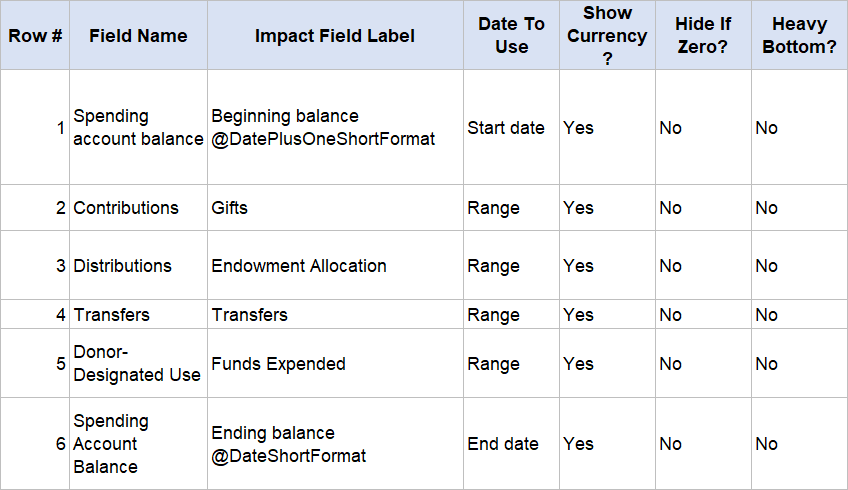
Note: The 'Donor-Designated Use' field captures actual spending against the donor's intended purpose (e.g., scholarships awarded, salary support, program expenses). This field is labeled 'Funds Expended' in the Fund Financial Performance reporting template.
Section 3: Sample Row Data
The examples below show how a correctly formatted import row looks for each fund type. Dollar amounts are numeric values only - no currency symbols or commas.
Sign Convention: Distributions (Endowment) and Donor-Designated Use (Expendable) represent money leaving the fund, and should be entered as negative values — matching the convention used when this activity is reported back to donors. The samples below reflect this.
3.1 Sample Endowment Row
Field |
Example Value |
| Start Date | 6/30/2025 |
| End Date | 6/30/2026 |
| Fund ID | 10000 |
| Fund Name | (Your fund name) |
| Beginning Market Value | 10000 |
| Ending Market Value | 13675 |
| Fund Performance | 6675 |
| Distributions | -4000 |
| Transfers | (blank if not applicable) |
| Contributions | 1000 |
| Ending Historical Gift | (blank if not reporting) |
| Reconcile Check | 0 (should equal 0 if Beginning + activity = Ending) |
| Net Asset Classification | (your institution's non-expendable classification) |
3.2 Sample Expendable Row
Field |
Example Value |
| Start Date | 6/30/2025 |
| End Date | 6/30/2026 |
| Fund ID | 10000-E |
| Fund Name | (Your fund name) |
| Beginning Spending Account Balance | 1000 |
| Ending Spending Account Balance | 1000 |
| Contributions | 1000 |
| Distributions | 4000 |
| Transfers | (blank if not applicable) |
| Donor-Designated Use | -5000 |
| Endow Fund ID | 10000 |
| Reconcile Check | 0 (should equal 0 if Beginning + activity = Ending) |
| Net Asset Classification | (your institution's expendable classification) |
Section 4: Key Data Rules & Validation
Fund ID
Must be unique across the entire import file
Cannot be changed after initial import without coordinating with EverTrue Support
For expendable funds linked to an endowment: use the endowment Fund ID with a consistent suffix convention (recommended: append “-E”)
Start Date / End Date (Reporting Period)
Must be provided for every row, as two separate columns — Start Date and End Date — not a combined date range
Both values must be identical across every record in the same file
Both the Start Date and End Date must fall on a month-end
Start Date is the prior period's month-end (for example, 6/30/2025 for a reporting period ending 6/30/2026), because it is the as-of date for each fund's Beginning Market Value or Beginning Spending Account Balance. A first-of-month date such as 7/1/2025 will not pass the month-end check
The Start Date cannot be after the End Date
For Expendable files, Start Date and End Date must match the Endowment file's values exactly
Supports annual and quarterly reporting cycles — confirm your frequency with EverTrue during implementation
Each Submission Replaces Prior Activity
Uploading a new file for a fund type (Endowment or Expendable) replaces the activity previously loaded for that reporting period for the funds included. Important implications:
Any fund that was loaded previously but is left off a new file will show no activity for that period once the new file is processed - the fund record itself is not deleted, but its activity is cleared.
Always include every fund you want reflected in the current reporting period file, even if a fund's activity hasn't changed.
Endowment Activity and Expendable Activity are uploaded and processed independently submitting one does not affect data already loaded for the other.
Currency / Numeric Fields
Enter all dollar amounts as plain numbers (e.g., 10000, not $10,000.00)
Round all dollar amounts to two decimal places - values carried out to additional decimals (common when data is exported from an investment or accounting system) should be rounded before you submit
Distributions (Endowment) and Donor-Designated Use (Expendable) should be entered into as negative values
Zero values are acceptable for applicable fields; do not leave required currency fields blank
Net Asset Classification
Must already exist in the system before you import it. If you need a new classification set up, contact Evertrue Support
Must be populated for every new fund (a fund that does not yet exist in the system) in the file
Each import type checks that submitted funds carry the matching classification: the Endowment import will reject a fund classified as Expendable, and the Expendable import will reject a fund not classified as Expendable
If you're unsure which import a fund belongs in, check its classification before submitting, or ask our support team.
Optional Fields — Hiding from Donor Reports
Purpose Description, Inception Date, and Ending Historical Gift are not displayed to donors in the out-of-the-box configuration
These fields can be included in the import for internal tracking without affecting the donor-facing report
If your institution wishes to display any of these fields, contact support.impact@evertrue.com to discuss configuration options
Date Format
Inception Date must be formatted as MM/DD/YYYY
Start Date and End Date must each fall on a month-end, formatted as shown in the sample data (e.g., 6/30/2025 and 6/30/2026)
Common Validation Errors
If a file doesn't pass validation, Support will see (and share with you) a message similar to one of the following:
The file has duplicate records for this Fund ID
Date must be a month-end
[Field name] is required for new funds
The Start Date cannot be after the End Date
All records must have the same Start Date and the same End Date
The Beginning Market Value does not match what is currently in the system for that post date (Endowment)
The Beginning Spending Account Balance does not match what is currently in the system for that post date (Expendable)
Expendable funds are not compatible with this import type (Endowment — fund is classified as Expendable)
This Net Asset Classification is not valid for Expendable funds (Expendable — fund is not classified as Expendable)
Section 5: Frequently Asked Questions
How do I submit my Fund Financial Activity file?
Submit a support ticket through by emailing support.impact@evertrue.com or using the orange Support widget in your database with your completed file(s) attached, noting the reporting period covered. Impact-only customers don't have direct access to Balance, so the Support team uploads the data on your behalf.
What happens if I leave a fund off a new file?
That fund's activity for the current reporting period will show as zero once the new file is loaded — the fund record itself stays in the system, but its activity is cleared for that period. Always include every fund you want reflected, even if unchanged.
Can I submit Endowment and Expendable Activity separately?
Yes. The two import types are processed independently, so submitting one does not affect activity already loaded for the other.
What if my institution does not track expendable funds separately?
Expendable fund reporting is optional. If your institution only tracks endowment fund activity, you only need to prepare the Endowment import.
Can field labels be changed in donor reports?
Yes. Most Impact Field Labels are configurable during implementation. The labels shown in this guide reflect the fund activity reporting defaults.
How often do I need to submit fund activity data?
The submission frequency is determined during your implementation and should align with your reporting cycle (annual or quarterly). Each file should contain records with the same Start Date and End Date.
What is the Reconcile Check column used for?
Reconcile Check is a self-check value you calculate and provide: for a complete activity roll-forward, Beginning value + activity = Ending value, and Reconcile Check should equal zero if your figures are correct. It's required when establishing a new fund record. It is not displayed to donors.
How is the Expendable fund linked to its parent Endowment fund?
The Endow Fund ID field in the Expendable import stores the Fund ID of the linked endowment fund. This association may be used for reporting or navigation purposes within Impact. It is not required, but is strongly recommended when both fund types are being imported.
Why does my Start Date need to be the prior period's month-end?
Start Date is the as-of date for each fund's beginning balance. For a reporting period ending 6/30/2026, the Start Date is 6/30/2025, and reports display the beginning balance as of the following day (7/1/2025). A first-of-month Start Date will be rejected because it is not a month-end.
Content aside
- 4 mths agoLast active
- 34Views
-
1
Following